ProblemDetails in ASP.NET Core: Saubere Fehlerantworten mit TraceId
Exceptions auf RFC 7807 ProblemDetails abbilden und eine traceId zurückgeben, damit Clients konsistente Fehler sehen und Logs eindeutig zuordenbar sind.
Tritt in einer API eine Exception auf, benötigt der Client trotzdem eine Fehlerantwort, die konsistent, sicher und leicht zu verarbeiten ist. Wenn jedes Endpoint-Pattern ein anderes JSON-Format zurückgibt (oder sogar Stacktraces), wird Client-Code schnell fragil und das Debugging unnötig schwierig.
Ein sauberer Ansatz ist, Fehler im Problem-Details-Format (RFC 7807) zurückzugeben und eine
traceId hinzuzufügen, damit sich die fehlerhafte Anfrage eindeutig dem passenden Log-Eintrag zuordnen lässt.
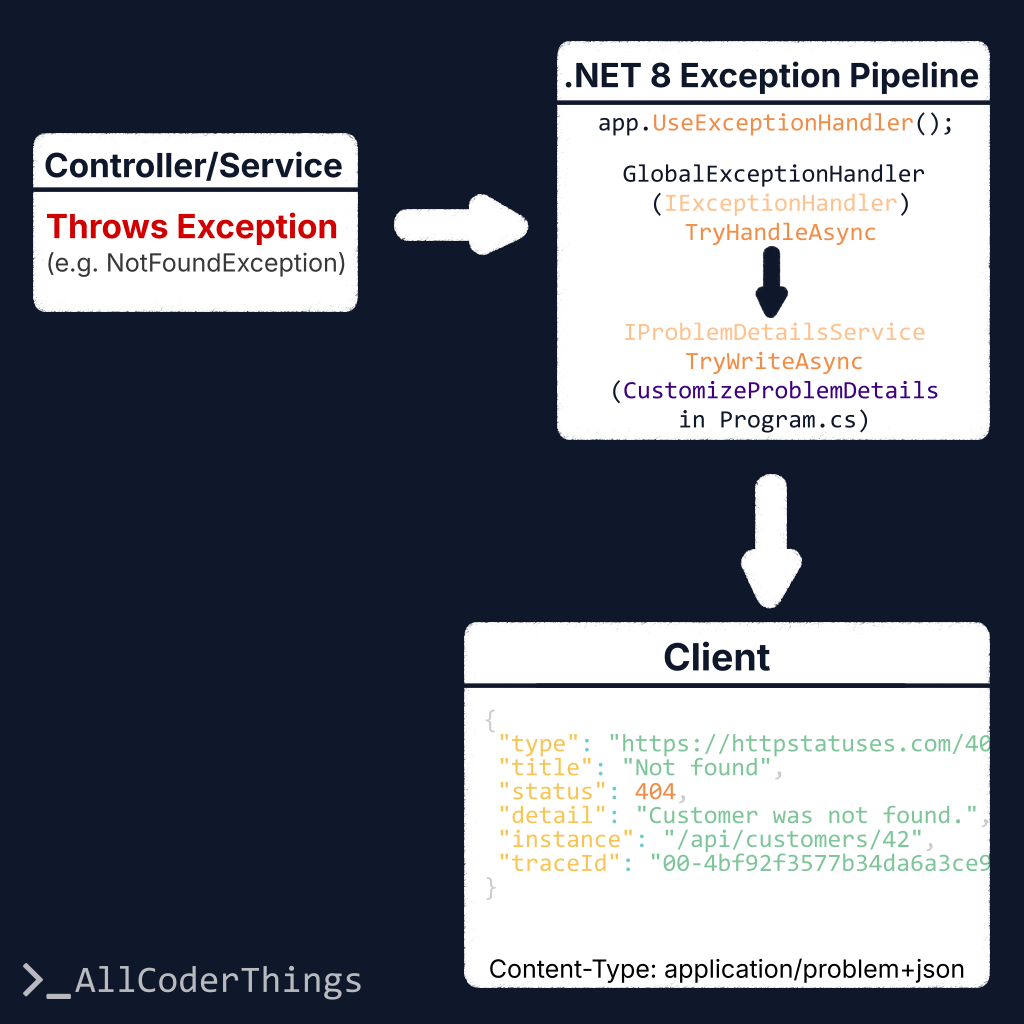
In .NET 8 basiert das moderne Setup auf der eingebauten IExceptionHandler-Pipeline zusammen mit AddProblemDetails().
Ziel
- Fehler in einem Standardformat zurückgeben (ProblemDetails).
- Exception-Typen auf passende HTTP-Statuscodes abbilden (400/404/409/500).
- Eine
traceIdfür schnelle Log-Korrelation hinzufügen. - Antworten produktionstauglich halten (keine Stacktraces nach außen).
Was ist ProblemDetails?
ProblemDetails ist ein standardisiertes Fehler-Payload-Format für HTTP-APIs. Typischerweise enthält es folgende Felder:
type: eine URI, die den Fehlertyp identifiziert (oft ein Link zur Dokumentation).title: eine kurze, gut lesbare Zusammenfassung.status: der HTTP-Statuscode.detail: Details (in Produktion vorsichtig verwenden).instance: Referenz auf den konkreten Fehlerfall (optional).
RFC 7807 erlaubt außerdem zusätzliche Felder (Extension Members). In diesem Beispiel fügen wir traceId hinzu.
Program.cs Setup (AddProblemDetails + IExceptionHandler)
AddProblemDetails() registriert die Problem-Details-Infrastruktur.
AddExceptionHandler<T>() registriert einen Handler, der Exceptions in passende ProblemDetails-Antworten übersetzt.
using System.Diagnostics;
using Microsoft.AspNetCore.Diagnostics;
using Microsoft.AspNetCore.Mvc;

var builder = WebApplication.CreateBuilder(args);

builder.Services.AddControllers();

// 1) ProblemDetails + globale Anpassung (fügt traceId zu allen ProblemDetails-Antworten hinzu)
builder.Services.AddProblemDetails(options =>
{
    options.CustomizeProblemDetails = ctx =>
    {
        var http = ctx.HttpContext;
        var traceId = Activity.Current?.Id ?? http.TraceIdentifier;

        // traceId zu jeder ProblemDetails-Antwort hinzufügen (ggf. auch bei Validation Errors)
        ctx.ProblemDetails.Extensions["traceId"] = traceId;

        // Sinnvolles Default für instance
        ctx.ProblemDetails.Instance ??= http.Request.Path;
    };
});

// 2) Exception-Handler registrieren (IExceptionHandler)
builder.Services.AddExceptionHandler<GlobalExceptionHandler>();

var app = builder.Build();

// 3) Eingebaute Exception-Handling-Middleware
app.UseExceptionHandler();

app.MapControllers();
app.Run();
GlobalExceptionHandler (Exceptions auf Statuscodes abbilden)
IExceptionHandler ermöglicht eine zentrale Exception-to-Response-Logik.
Bekannte Exceptions erhalten aussagekräftige HTTP-Statuscodes (404/409/400).
Unbekannte Fehler werden als 500 mit einer sicheren (generischen) Nachricht zurückgegeben.
using Microsoft.AspNetCore.Diagnostics;
using Microsoft.AspNetCore.Mvc;

public sealed class GlobalExceptionHandler(
    ILogger<GlobalExceptionHandler> logger,
    IProblemDetailsService problemDetailsService) : IExceptionHandler
{
    private readonly ILogger<GlobalExceptionHandler> _logger = logger;
    private readonly IProblemDetailsService _problemDetailsService = problemDetailsService;

    public async ValueTask<bool> TryHandleAsync(
        HttpContext httpContext,
        Exception exception,
        CancellationToken cancellationToken)
    {
        var (status, title, type, detail) = Map(exception);

        // Vollständige Details serverseitig loggen (nicht im Response ausgeben)
        _logger.LogError(exception, "Unhandled exception ({Status}).", status);

        var problem = new ProblemDetails
        {
            Status = status,
            Title = title,
            Type = type,
            Detail = detail,
            Instance = httpContext.Request.Path
        };

        httpContext.Response.StatusCode = status;

        // Schreibt "application/problem+json" und wendet AddProblemDetails-Customization an (traceId etc.)
        return await _problemDetailsService.TryWriteAsync(new ProblemDetailsContext
        {
            HttpContext = httpContext,
            ProblemDetails = problem,
            Exception = exception
        });
    }

    private static (int status, string title, string type, string detail) Map(Exception ex)
    {
        return ex switch
        {
            NotFoundException nf => (StatusCodes.Status404NotFound, "Not found", "https://httpstatuses.com/404", nf.Message),
            ConflictException cf => (StatusCodes.Status409Conflict, "Conflict", "https://httpstatuses.com/409", cf.Message),
            ValidationException ve => (StatusCodes.Status400BadRequest, "Validation error", "https://httpstatuses.com/400", ve.Message),

            // Unbekannt / unerwartet
            _ => (StatusCodes.Status500InternalServerError, "Unexpected error", "https://httpstatuses.com/500",
                  "Ein unerwarteter Fehler ist aufgetreten.")
        };
    }
}
Beispiel-Exceptions
Kleine, klare Exception-Typen machen das Mapping einfach und gut lesbar:
public sealed class NotFoundException(string message) : Exception(message);
public sealed class ConflictException(string message) : Exception(message);
public sealed class ValidationException(string message) : Exception(message);
Beispiel-Ausgabe
Die Response behält eine vorhersehbare Struktur und enthält traceId:
{
  "type": "https://httpstatuses.com/404",
  "title": "Not found",
  "status": 404,
  "detail": "Customer was not found.",
  "instance": "/api/customers/42",
  "traceId": "00-4bf92f3577b34da6a3ce929d0e0e4736-00f067aa0ba902b7-01"
}
Client-Seite: traceId für Support / Debugging nutzen
Client-Code kann eine freundliche Meldung anzeigen und traceId als Referenz für die Fehleranalyse speichern:
const res = await fetch("/api/customers/42");

if (!res.ok) {
  const contentType = res.headers.get("Content-Type") || "";
  let payload;

  if (contentType.includes("application/problem+json") || contentType.includes("application/json")) {
    payload = await res.json();
  } else {
    // Fallback: HTML/plain-text usw.
    payload = { title: "Unexpected error", detail: await res.text() };
  }

  console.error("API error:", payload);

  // Bei ProblemDetails kann traceId vorhanden sein (sonst leer)
  const traceId = payload?.traceId || payload?.extensions?.traceId;

  alert(`Etwas ist schiefgelaufen.${traceId ? ` Referenz: ${traceId}` : ""}`);
}
Häufige Verbesserungen
- Eine anwendungsspezifische
errorCode(z. B."CUSTOMER_NOT_FOUND") inextensionsergänzen. - Field-Level-Validation als
{ field, message }[]zurückgeben (als separates Example). - Statt
httpstatuses.comeine stabiletype-URL zur eigenen Doku verwenden. - Bei 500-Fehlern
detailin Produktion allgemein halten (das macht dieses Beispiel).
TL;DR
- Für konsistente Fehlerantworten ProblemDetails (RFC 7807) verwenden.
- In .NET 8 ist der moderne Ansatz:
IExceptionHandler+AddProblemDetails(). - Über
CustomizeProblemDetailseinetraceIdhinzufügen, um Fehler mit Logs zu korrelieren. - In Produktion keine Stacktraces zurückgeben.