ASP.NET Core'da ProblemDetails: TraceId ile Temiz Hata Yanıtları
Exception'ları RFC 7807 ProblemDetails formatına çevirin ve traceId ekleyin. Böylece istemci tutarlı hata alır, loglarda ilgili isteği kolayca bulursunuz.
Bir API’de hata oluştuğunda (exception fırlatıldığında), istemci tarafı yine de tutarlı, güvenli ve kolay tüketilebilir bir hata yanıtına ihtiyaç duyar. Her endpoint’in farklı bir JSON formatı döndürmesi (ya da stack trace sızdırması), istemci kodunu kırılgan hale getirir ve debug sürecini zorlaştırır.
Temiz bir yaklaşım, hataları Problem Details (RFC 7807) formatında döndürmek ve
traceId ekleyerek hatalı isteğin sunucu logundaki kaydıyla eşleştirilmesini sağlamaktır.
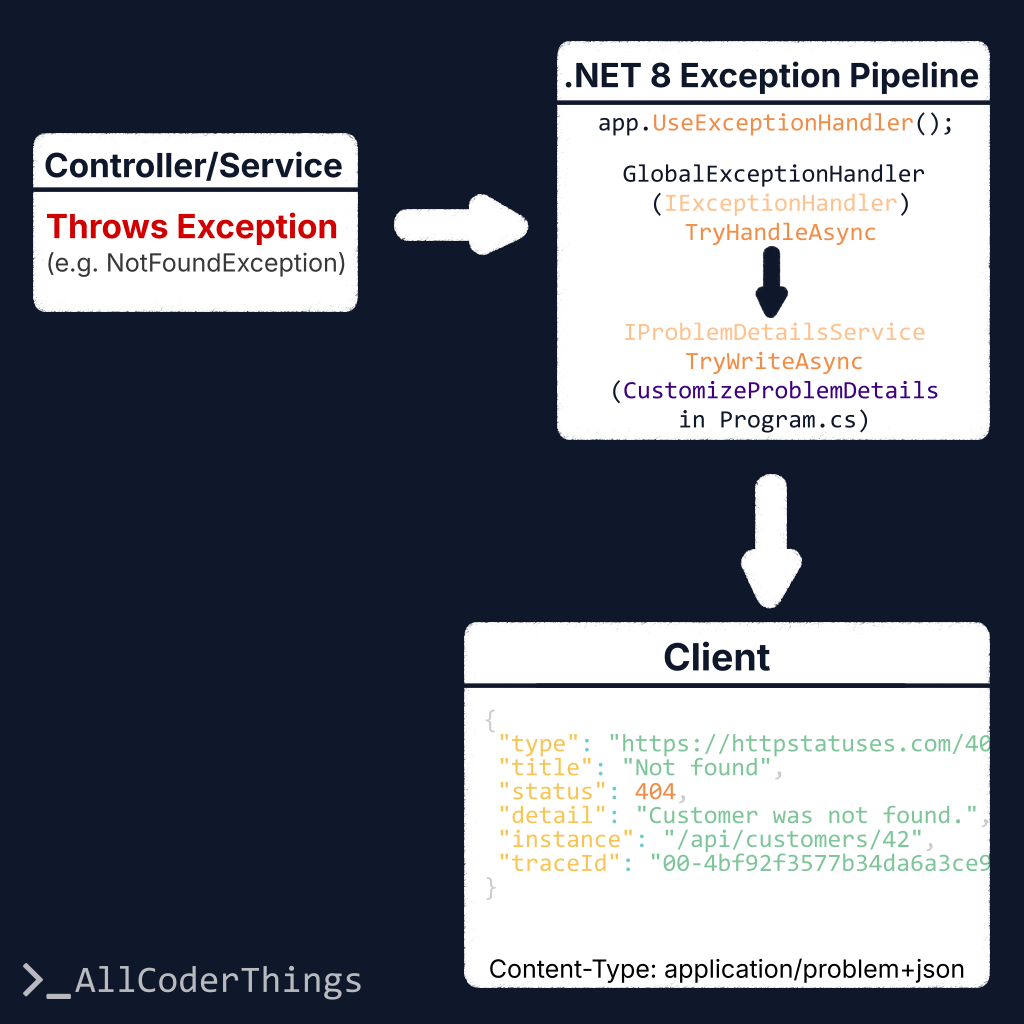
.NET 8’de modern kurgu, yerleşik IExceptionHandler pipeline’ını AddProblemDetails() ile birlikte kullanmaktır.
Amaç
- Hataları standart bir formatta döndürmek (ProblemDetails).
- Exception türlerini doğru HTTP status kodlarına haritalamak (400/404/409/500).
- Log korelasyonu için
traceIdeklemek. - Production ortamında güvenli kalmak (stack trace sızdırmamak).
ProblemDetails nedir?
ProblemDetails, HTTP API’ler için standart bir hata yanıtı yapısıdır. Genelde şu alanları içerir:
type: hata türünü tanımlayan bir URI (çoğu zaman dokümantasyon linki).title: kısa ve okunabilir hata başlığı.status: HTTP status code.detail: detay mesaj (production’da güvenli tutmak gerekir).instance: hatanın oluştuğu spesifik durumu işaret eden referans (opsiyonel).
RFC 7807, ek alanlar (extension members) eklenmesine de izin verir. Bu örnekte traceId ekliyoruz.
Program.cs Kurulumu (AddProblemDetails + IExceptionHandler)
AddProblemDetails() Problem Details altyapısını ekler.
AddExceptionHandler<T>() ise exception’ları uygun ProblemDetails yanıtına çeviren handler’ı register eder.
using System.Diagnostics;
using Microsoft.AspNetCore.Diagnostics;
using Microsoft.AspNetCore.Mvc;

var builder = WebApplication.CreateBuilder(args);

builder.Services.AddControllers();

// 1) ProblemDetails + global customization (tüm ProblemDetails yanıtlarına traceId ekler)
builder.Services.AddProblemDetails(options =>
{
    options.CustomizeProblemDetails = ctx =>
    {
        var http = ctx.HttpContext;
        var traceId = Activity.Current?.Id ?? http.TraceIdentifier;

        // Tüm ProblemDetails yanıtlarına traceId ekle (uygunsa validation hatalarında da)
        ctx.ProblemDetails.Extensions["traceId"] = traceId;

        // instance için kullanışlı bir default
        ctx.ProblemDetails.Instance ??= http.Request.Path;
    };
});

// 2) Exception handler register et (IExceptionHandler)
builder.Services.AddExceptionHandler<GlobalExceptionHandler>();

var app = builder.Build();

// 3) Yerleşik exception handling middleware
app.UseExceptionHandler();

app.MapControllers();
app.Run();
GlobalExceptionHandler (Exception → Status Code Haritalama)
IExceptionHandler, exception-to-response mapping işini merkezi bir noktada yapmanıza imkan tanır.
Bilinen exception’lar anlamlı HTTP status kodlarıyla döner (404/409/400).
Bilinmeyen durumlar ise güvenli bir mesajla 500 döner.
using Microsoft.AspNetCore.Diagnostics;
using Microsoft.AspNetCore.Mvc;

public sealed class GlobalExceptionHandler(
    ILogger<GlobalExceptionHandler> logger,
    IProblemDetailsService problemDetailsService) : IExceptionHandler
{
    private readonly ILogger<GlobalExceptionHandler> _logger = logger;
    private readonly IProblemDetailsService _problemDetailsService = problemDetailsService;

    public async ValueTask<bool> TryHandleAsync(
        HttpContext httpContext,
        Exception exception,
        CancellationToken cancellationToken)
    {
        var (status, title, type, detail) = Map(exception);

        // Sunucu tarafında tüm detayları logla (exception response'a taşınmasın)
        _logger.LogError(exception, "Unhandled exception ({Status}).", status);

        var problem = new ProblemDetails
        {
            Status = status,
            Title = title,
            Type = type,
            Detail = detail,
            Instance = httpContext.Request.Path
        };

        httpContext.Response.StatusCode = status;

        // "application/problem+json" yazar ve AddProblemDetails customization'ını uygular (traceId vb.)
        return await _problemDetailsService.TryWriteAsync(new ProblemDetailsContext
        {
            HttpContext = httpContext,
            ProblemDetails = problem,
            Exception = exception
        });
    }

    private static (int status, string title, string type, string detail) Map(Exception ex)
    {
        return ex switch
        {
            NotFoundException nf => (StatusCodes.Status404NotFound, "Not found", "https://httpstatuses.com/404", nf.Message),
            ConflictException cf => (StatusCodes.Status409Conflict, "Conflict", "https://httpstatuses.com/409", cf.Message),
            ValidationException ve => (StatusCodes.Status400BadRequest, "Validation error", "https://httpstatuses.com/400", ve.Message),

            // Bilinmeyen / beklenmeyen
            _ => (StatusCodes.Status500InternalServerError, "Unexpected error", "https://httpstatuses.com/500",
                  "Beklenmeyen bir hata oluştu.")
        };
    }
}
Örnek Exception Sınıfları
Küçük ve net exception türleri, mapping kısmını basit ve okunabilir tutar:
public sealed class NotFoundException(string message) : Exception(message);
public sealed class ConflictException(string message) : Exception(message);
public sealed class ValidationException(string message) : Exception(message);
Örnek Çıktı
Response yapısı tahmin edilebilir kalır ve traceId içerir:
{
  "type": "https://httpstatuses.com/404",
  "title": "Not found",
  "status": 404,
  "detail": "Customer was not found.",
  "instance": "/api/customers/42",
  "traceId": "00-4bf92f3577b34da6a3ce929d0e0e4736-00f067aa0ba902b7-01"
}
İstemci Tarafı: traceId ile Destek / Debug
İstemci kodu kullanıcıya daha anlaşılır bir mesaj gösterebilir ve traceId değerini hata takibi için saklayabilir:
const res = await fetch("/api/customers/42");

if (!res.ok) {
  const contentType = res.headers.get("Content-Type") || "";
  let payload;

  if (contentType.includes("application/problem+json") || contentType.includes("application/json")) {
    payload = await res.json();
  } else {
    // Fallback: HTML/plain-text gibi durumlar
    payload = { title: "Unexpected error", detail: await res.text() };
  }

  console.error("API error:", payload);

  // ProblemDetails ise traceId bulunabilir (yoksa boş geçilir)
  const traceId = payload?.traceId || payload?.extensions?.traceId;

  alert(`Bir hata oluştu.${traceId ? ` Referans: ${traceId}` : ""}`);
}
Sık Yapılan İyileştirmeler
extensionsiçine uygulamaya özel birerrorCodeekleyin (ör."CUSTOMER_NOT_FOUND").- Alan bazlı validation hatalarını
{ field, message }[]gibi bir formatta döndürün (ayrı bir example olabilir). httpstatuses.comyerine kendi dokümantasyon sayfanıza giden sabit birtypeURL’i kullanın.- 500 hatalarında
detailalanını production’da genel tutun (bu örnek bunu yapıyor).
TL;DR
- Tutarlı hata yanıtları için ProblemDetails (RFC 7807) kullanın.
- .NET 8’de modern yaklaşım:
IExceptionHandler+AddProblemDetails(). CustomizeProblemDetailsiletraceIdekleyerek hataları loglarla eşleştirin.- Production ortamında stack trace döndürmeyin.