ProblemDetails en ASP.NET Core: errores limpios con TraceId
Mapea excepciones a ProblemDetails (RFC 7807) y devuelve un traceId para errores consistentes y para localizar la petición exacta en los logs.
Cuando ocurre una excepción en una API, el cliente igualmente necesita una respuesta de error consistente, segura y fácil de consumir. Devolver estructuras JSON distintas (o incluso stack traces) hace que el código del cliente sea frágil y vuelve el debugging mucho más doloroso.
Un enfoque limpio es devolver los errores usando Problem Details (RFC 7807) e incluir un
traceId para poder vincular la petición fallida con la entrada exacta en los logs.
En .NET 8, la configuración moderna usa el pipeline integrado IExceptionHandler junto con AddProblemDetails().
Objetivo
- Devolver errores en un formato estándar (ProblemDetails).
- Mapear tipos de excepciones a los códigos HTTP correctos (400/404/409/500).
- Incluir un
traceIdpara correlacionar rápidamente con los logs. - Mantener respuestas seguras en producción (sin exponer stack traces).
¿Qué es ProblemDetails?
ProblemDetails es un formato estándar de payload de error para APIs HTTP. Normalmente incluye estos campos:
type: una URI que identifica el tipo de error (a menudo un enlace a documentación).title: un resumen corto y legible.status: el código de estado HTTP.detail: detalles (mantenerlo seguro en producción).instance: referencia a la ocurrencia específica (opcional).
El RFC 7807 también permite agregar campos extra (extension members). En este ejemplo agregamos traceId.
Configuración en Program.cs (AddProblemDetails + IExceptionHandler)
AddProblemDetails() registra la infraestructura de Problem Details.
AddExceptionHandler<T>() registra un handler que mapea excepciones a la respuesta ProblemDetails correcta.
using System.Diagnostics;
using Microsoft.AspNetCore.Diagnostics;
using Microsoft.AspNetCore.Mvc;

var builder = WebApplication.CreateBuilder(args);

builder.Services.AddControllers();

// 1) ProblemDetails + personalización global (agrega traceId a todas las respuestas ProblemDetails)
builder.Services.AddProblemDetails(options =>
{
    options.CustomizeProblemDetails = ctx =>
    {
        var http = ctx.HttpContext;
        var traceId = Activity.Current?.Id ?? http.TraceIdentifier;

        // Agregar traceId a cada ProblemDetails (incluyendo errores de validación cuando aplique)
        ctx.ProblemDetails.Extensions["traceId"] = traceId;

        // Default útil para instance
        ctx.ProblemDetails.Instance ??= http.Request.Path;
    };
});

// 2) Registrar el exception handler (IExceptionHandler)
builder.Services.AddExceptionHandler<GlobalExceptionHandler>();

var app = builder.Build();

// 3) Middleware integrado para manejo de excepciones
app.UseExceptionHandler();

app.MapControllers();
app.Run();
GlobalExceptionHandler (Mapear excepciones a códigos de estado)
IExceptionHandler permite centralizar la lógica de exception → response.
Las excepciones conocidas devuelven status HTTP significativos (404/409/400).
Las excepciones desconocidas devuelven 500 con un mensaje seguro (genérico).
using Microsoft.AspNetCore.Diagnostics;
using Microsoft.AspNetCore.Mvc;

public sealed class GlobalExceptionHandler(
    ILogger<GlobalExceptionHandler> logger,
    IProblemDetailsService problemDetailsService) : IExceptionHandler
{
    private readonly ILogger<GlobalExceptionHandler> _logger = logger;
    private readonly IProblemDetailsService _problemDetailsService = problemDetailsService;

    public async ValueTask<bool> TryHandleAsync(
        HttpContext httpContext,
        Exception exception,
        CancellationToken cancellationToken)
    {
        var (status, title, type, detail) = Map(exception);

        // Loguear todos los detalles en el servidor (no exponerlos en la respuesta)
        _logger.LogError(exception, "Unhandled exception ({Status}).", status);

        var problem = new ProblemDetails
        {
            Status = status,
            Title = title,
            Type = type,
            Detail = detail,
            Instance = httpContext.Request.Path
        };

        httpContext.Response.StatusCode = status;

        // Escribe "application/problem+json" y aplica la personalización de AddProblemDetails (traceId, etc.)
        return await _problemDetailsService.TryWriteAsync(new ProblemDetailsContext
        {
            HttpContext = httpContext,
            ProblemDetails = problem,
            Exception = exception
        });
    }

    private static (int status, string title, string type, string detail) Map(Exception ex)
    {
        return ex switch
        {
            NotFoundException nf => (StatusCodes.Status404NotFound, "Not found", "https://httpstatuses.com/404", nf.Message),
            ConflictException cf => (StatusCodes.Status409Conflict, "Conflict", "https://httpstatuses.com/409", cf.Message),
            ValidationException ve => (StatusCodes.Status400BadRequest, "Validation error", "https://httpstatuses.com/400", ve.Message),

            // Desconocida / inesperada
            _ => (StatusCodes.Status500InternalServerError, "Unexpected error", "https://httpstatuses.com/500",
                  "Ocurrió un error inesperado.")
        };
    }
}
Excepciones de ejemplo
Tipos de excepción pequeños y explícitos hacen que el mapping sea simple y legible:
public sealed class NotFoundException(string message) : Exception(message);
public sealed class ConflictException(string message) : Exception(message);
public sealed class ValidationException(string message) : Exception(message);
Salida de ejemplo
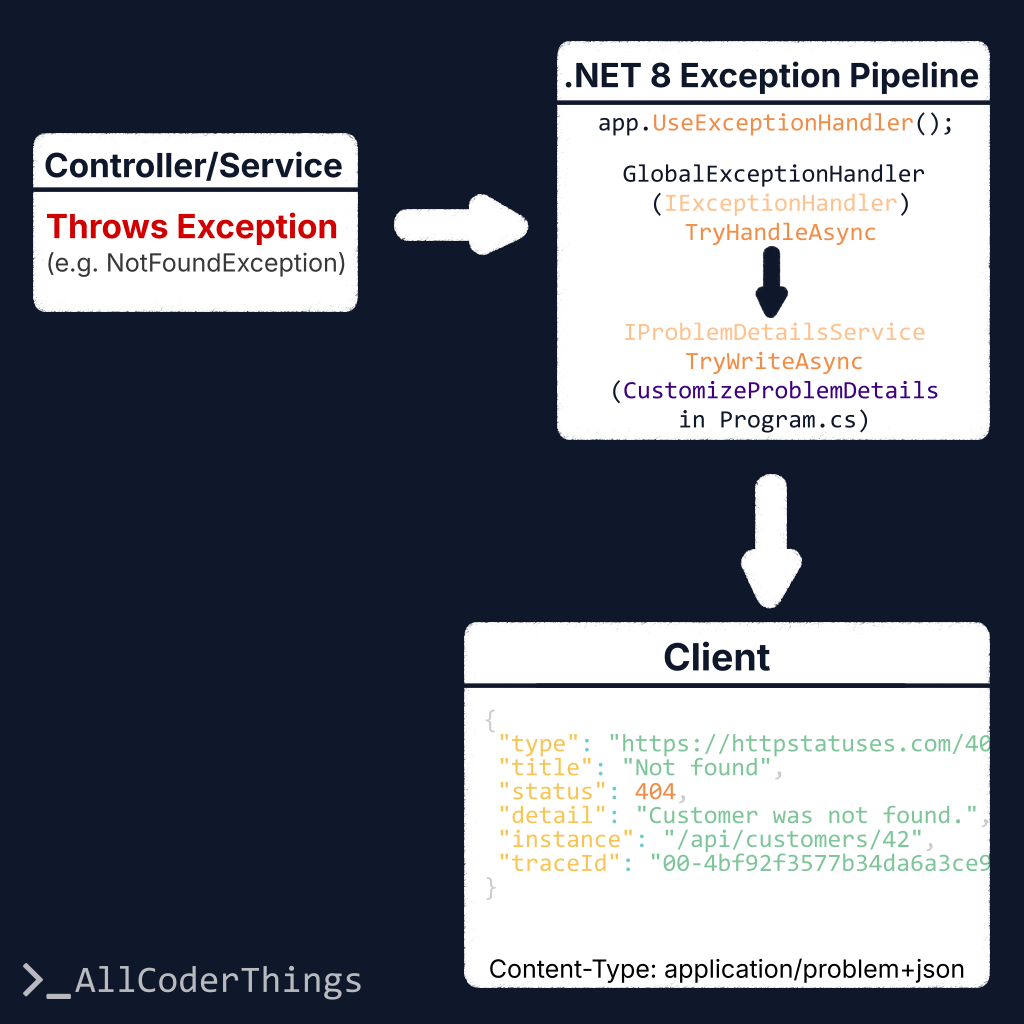
La respuesta mantiene una estructura predecible e incluye traceId:
{
  "type": "https://httpstatuses.com/404",
  "title": "Not found",
  "status": 404,
  "detail": "Customer was not found.",
  "instance": "/api/customers/42",
  "traceId": "00-4bf92f3577b34da6a3ce929d0e0e4736-00f067aa0ba902b7-01"
}
Lado del cliente: usar traceId para soporte / debugging
El código del cliente puede mostrar un mensaje más claro y conservar traceId como referencia para la investigación:
const res = await fetch("/api/customers/42");

if (!res.ok) {
  const contentType = res.headers.get("Content-Type") || "";
  let payload;

  if (contentType.includes("application/problem+json") || contentType.includes("application/json")) {
    payload = await res.json();
  } else {
    // Fallback: HTML/plain-text, etc.
    payload = { title: "Unexpected error", detail: await res.text() };
  }

  console.error("API error:", payload);

  // Si es ProblemDetails, traceId puede existir (si no, vacío)
  const traceId = payload?.traceId || payload?.extensions?.traceId;

  alert(`Algo salió mal.${traceId ? ` Referencia: ${traceId}` : ""}`);
}
Mejoras comunes
- Agregar un
errorCodeespecífico de la aplicación (p. ej."CUSTOMER_NOT_FOUND") enextensions. - Devolver validación por campo como
{ field, message }[](puede ser otro example aparte). - Usar una URL
typeestable apuntando a tu propia documentación en lugar dehttpstatuses.com. - En errores 500, mantener
detailgenérico en producción (este ejemplo lo hace).
TL;DR
- Usa ProblemDetails (RFC 7807) para respuestas de error consistentes.
- En .NET 8, el enfoque moderno es:
IExceptionHandler+AddProblemDetails(). - Agrega
traceIdconCustomizeProblemDetailspara correlacionar errores con logs. - No expongas stack traces en producción.