ProblemDetails in ASP.NET Core: Clean Error Responses with TraceId
Map exceptions to RFC 7807 ProblemDetails and include a traceId so clients get consistent errors and you can match the exact request in logs.
When an exception happens in an API, the client still needs an error response that is consistent, safe, and easy to consume. Returning random JSON shapes (or stack traces) makes client code fragile and debugging painful.
A clean approach is to return errors using Problem Details (RFC 7807) and include a traceId
so the failing request can be matched to the exact log entry.
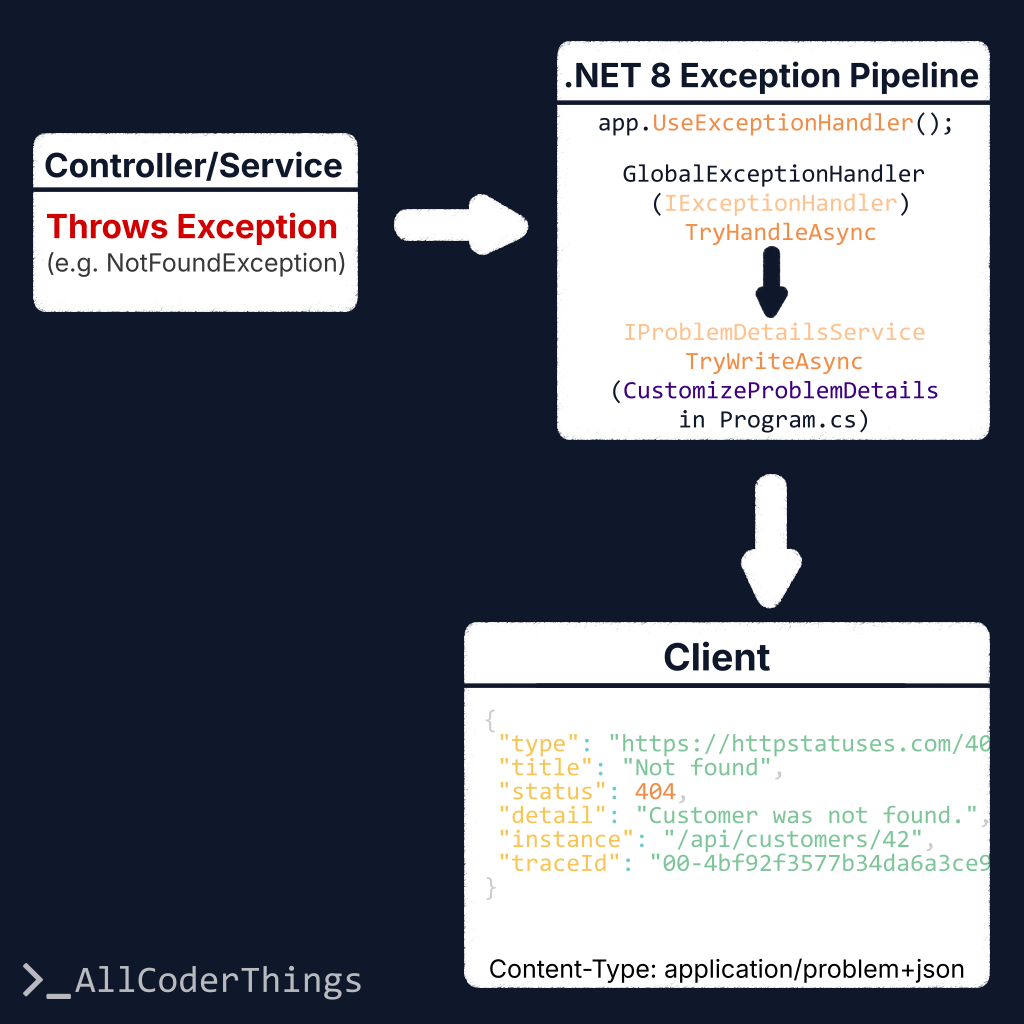
In .NET 8, the modern setup uses the built-in IExceptionHandler pipeline together with AddProblemDetails().
Goal
- Return errors in a standard format (ProblemDetails).
- Map exception types to correct HTTP status codes (400/404/409/500).
- Include a
traceIdfor fast log correlation. - Keep responses production-safe (no stack traces exposed).
What is ProblemDetails?
ProblemDetails is a standard error payload shape with these common fields:
type: a URI that identifies the error type (often a documentation link).title: a short, human-readable summary.status: the HTTP status code.detail: details (keep this safe in production).instance: a reference to the specific occurrence (optional).
RFC 7807 also allows adding extra fields (extension members). This example adds traceId.
Program.cs Setup (AddProblemDetails + IExceptionHandler)
AddProblemDetails() registers the Problem Details infrastructure.
AddExceptionHandler<T>() registers a handler that maps exceptions to the right ProblemDetails response.
using System.Diagnostics;
using Microsoft.AspNetCore.Diagnostics;
using Microsoft.AspNetCore.Mvc;

var builder = WebApplication.CreateBuilder(args);

builder.Services.AddControllers();

// 1) ProblemDetails + global customization (adds traceId to all ProblemDetails responses)
builder.Services.AddProblemDetails(options =>
{
    options.CustomizeProblemDetails = ctx =>
    {
        var http = ctx.HttpContext;
        var traceId = Activity.Current?.Id ?? http.TraceIdentifier;

        // Add traceId to every ProblemDetails (including validation errors, when applicable)
        ctx.ProblemDetails.Extensions["traceId"] = traceId;

        // A useful default for instance
        ctx.ProblemDetails.Instance ??= http.Request.Path;
    };
});

// 2) Register exception handler (IExceptionHandler)
builder.Services.AddExceptionHandler<GlobalExceptionHandler>();

var app = builder.Build();

// 3) Add the built-in exception handling middleware
app.UseExceptionHandler();

app.MapControllers();
app.Run();
GlobalExceptionHandler (Map Exceptions to Status Codes)
IExceptionHandler lets the application centralize exception-to-response mapping.
Known exceptions get meaningful HTTP statuses (404/409/400). Unknown exceptions return 500 with a safe message.
using Microsoft.AspNetCore.Diagnostics;
using Microsoft.AspNetCore.Mvc;

public sealed class GlobalExceptionHandler(
    ILogger<GlobalExceptionHandler> logger,
    IProblemDetailsService problemDetailsService) : IExceptionHandler
{
    private readonly ILogger<GlobalExceptionHandler> _logger = logger;
    private readonly IProblemDetailsService _problemDetailsService = problemDetailsService;

    public async ValueTask<bool> TryHandleAsync(
        HttpContext httpContext,
        Exception exception,
        CancellationToken cancellationToken)
    {
        var (status, title, type, detail) = Map(exception);

        // Log full details server-side
        _logger.LogError(exception, "Unhandled exception ({Status}).", status);

        var problem = new ProblemDetails
        {
            Status = status,
            Title = title,
            Type = type,
            Detail = detail,
            Instance = httpContext.Request.Path
        };

        httpContext.Response.StatusCode = status;

        // This writes "application/problem+json" and applies AddProblemDetails customization (traceId, etc.)
        return await _problemDetailsService.TryWriteAsync(new ProblemDetailsContext
        {
            HttpContext = httpContext,
            ProblemDetails = problem,
            Exception = exception
        });
    }

    private static (int status, string title, string type, string detail) Map(Exception ex)
    {
        return ex switch
        {
            NotFoundException nf => (StatusCodes.Status404NotFound, "Not found", "https://httpstatuses.com/404", nf.Message),
            ConflictException cf => (StatusCodes.Status409Conflict, "Conflict", "https://httpstatuses.com/409", cf.Message),
            ValidationException ve => (StatusCodes.Status400BadRequest, "Validation error", "https://httpstatuses.com/400", ve.Message),

            // Unknown/unexpected
            _ => (StatusCodes.Status500InternalServerError, "Unexpected error", "https://httpstatuses.com/500",
                  "An unexpected error occurred.")
        };
    }
}
Example Exceptions
Small, explicit exception types make mapping simple and readable:
public sealed class NotFoundException(string message) : Exception(message);
public sealed class ConflictException(string message) : Exception(message);
public sealed class ValidationException(string message) : Exception(message);
Example Output
The response keeps a predictable shape and includes traceId:
{
  "type": "https://httpstatuses.com/404",
  "title": "Not found",
  "status": 404,
  "detail": "Customer was not found.",
  "instance": "/api/customers/42",
  "traceId": "00-4bf92f3577b34da6a3ce929d0e0e4736-00f067aa0ba902b7-01"
}
Client Side: Use traceId for Support
Client code can show a friendly message and keep traceId as a reference for troubleshooting:
const res = await fetch("/api/customers/42");

if (!res.ok) {
  const contentType = res.headers.get("Content-Type") || "";
  let payload;

  if (contentType.includes("application/problem+json") || contentType.includes("application/json")) {
    payload = await res.json();
  } else {
    // Fallback: HTML/plain-text gibi durumlar
    payload = { title: "Unexpected error", detail: await res.text() };
  }

  console.error("API error:", payload);

  // ProblemDetails ise traceId bulunabilir (yoksa boş geçilir)
  const traceId = payload?.traceId || payload?.extensions?.traceId;

  alert(`Something went wrong.${traceId ? ` Reference: ${traceId}` : ""}`);
}
Common Improvements
- Add an application-specific
errorCode(e.g.,"CUSTOMER_NOT_FOUND") toextensions. - Return field-level validation as
{ field, message }[](can be a separate example). - Use a stable
typeURL pointing to your own docs instead ofhttpstatuses.com. - Keep 500
detailgeneric in production (this example does).
TL;DR
- Use ProblemDetails (RFC 7807) for consistent error responses.
- In .NET 8, prefer
IExceptionHandler+AddProblemDetails()for a modern setup. - Add
traceId(viaCustomizeProblemDetails) to correlate client errors with logs. - Do not expose stack traces in production.