First C++ Program: How “Hello World” Works
Write your first C++ program and learn how “Hello World” works, including compilation, execution, and basic program flow.
For beginners learning the C++ language, the most traditional first example is the “Hello, World!” program. This example is the best starting point to understand how a C++ application is compiled and executed. In this article, we’ll walk through how to write a simple console output in C++, how the compilation process works, and what each line of code means, step by step.
1. The First C++ Program
Create a new Console Application in Visual Studio 2022 or any GCC/Clang environment and write the following code:
#include <iostream>   // Library for input/output operations
using namespace std;  // Declares that we’ll use the std namespace

int main() {
    cout << "Hello, World!" << endl; // Prints message to the console
    return 0;                        // Indicates successful program termination
}
When you run this code, the console will display:
Hello, World!
2. Line-by-Line Explanation
#include <iostream>→ This line includes the Input-Output Stream library, which allows input and output operations.using namespace std;→ In C++, many classes and functions are defined inside thestdnamespace. This line allows us to usecoutinstead of writingstd::couteach time.int main()→ The entry point of every C++ program. Every program must have exactly onemainfunction.cout << "Hello, World!" << endl;→cout(console output) is used to print data to the screen. The<<operator means “send data to.”endladds a newline at the end of the output.return 0;→ Themainfunction returns anint. Returning0means the program executed successfully.
3. Compilation and Execution Process
Writing the code is not enough — it needs to be compiled into an executable file. Here’s how the compilation process works:
- Source code: Written in a
.cppfile. - Compiler: Translates source code into machine code.
- Linker: Combines libraries and functions, producing an
.exeor.outfile. - Execution: The resulting file is run by the operating system.
Simplified compilation flow:
Source Code (.cpp)
     ↓
Compiler (g++)
     ↓
Object File (.o)
     ↓
Linker
     ↓
Executable File (.exe / .out)
4. Running “Hello World” in Visual Studio 2022
- Open Visual Studio.
- Select “Create New Project” → “Console App” (C++).
- Set the project name, e.g.,
HelloWorld. - Paste the above code into the generated
main.cppfile. - Press Ctrl + F5 to build and run the program.
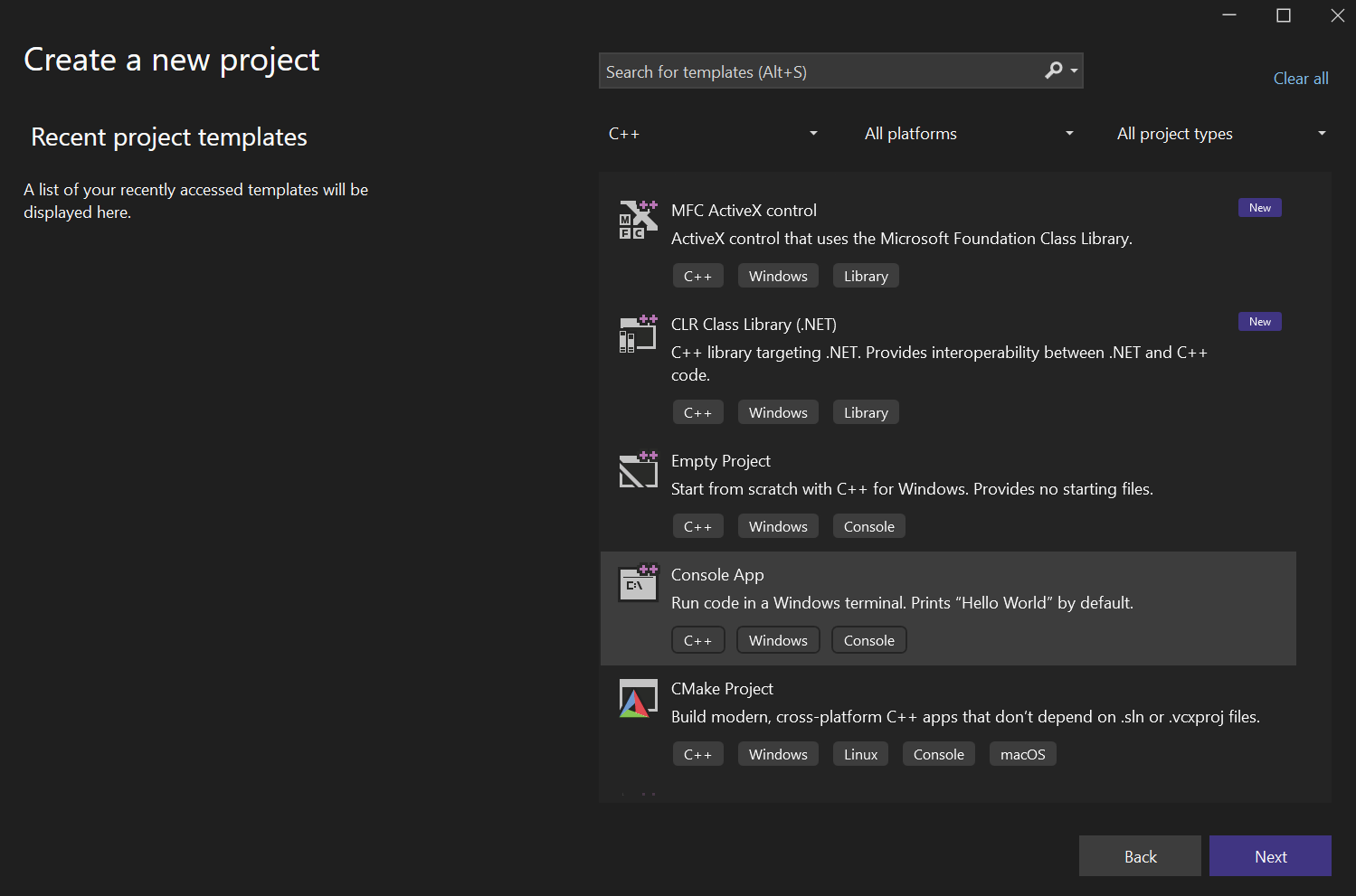
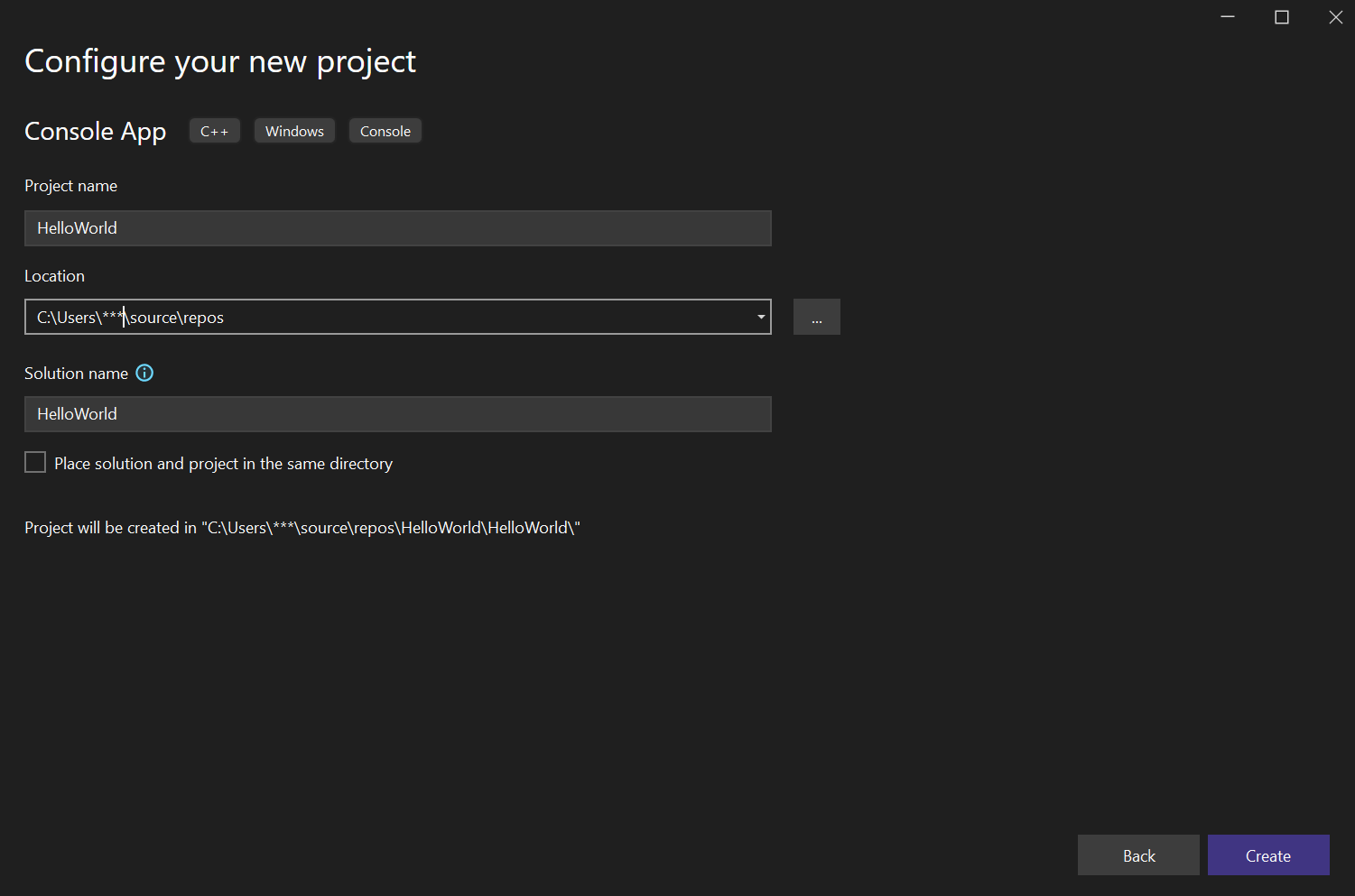
If the output window shows Hello, World!, congratulations — your first C++ program ran successfully.
5. Compiling with GCC or Clang (Linux / Windows MSYS2)
If you’re not using Visual Studio, you can do the same from a terminal.
Save your code as hello.cpp and run the following command:
g++ -std=c++20 hello.cpp -o hello
./hello
Or, if you’re using Clang:
clang++ -std=c++20 hello.cpp -o hello
./hello
In both cases, the output will be:
Hello, World!
6. Common Errors
- Missing semicolon (;): Every statement must end with
;. - Incorrect quotation marks: On some keyboards, use
" "instead of fancy quotes“”. - Wrong file extension: C++ files must be saved with the
.cppextension. - Missing namespace: If
using namespace std;is not included, usestd::coutinstead ofcout.
7. TL;DR
- C++ programs start from the main() function.
#include <iostream>→ adds the input/output library.cout→ prints output to the screen.- You can run the program using Visual Studio 2022 or GCC.
- If you see “Hello, World!” as output, your C++ journey has officially begun!
Related Articles
Introduction to Functions in C++: Define, Call, Parameters
Learn functions in C++, including defining, calling, and using parameters to build modular and reusable programs.
Setting up C++ Compiler & IDE (Visual Studio, GCC, Clang)
Learn how to set up a C++ development environment using Visual Studio, GCC, and Clang compilers with step-by-step guidance.
String Handling in C++: C-Style and std::string
Learn string handling in C++ using C-style strings and std::string for text processing, concatenation, and manipulation.
Variables, Data Types, and auto in C++
Learn variables, data types, and the auto keyword in C++ with practical examples of type deduction and memory usage.
What is C++? First Steps in Programming
Learn the basics of C++ programming, its core concepts, common use cases, and how to write your first programs.